layout: post keywords: blog description: blog title: "Activity生命周期详解一" categories: [Android] tags: [Activity]
{% include codepiano/setup %}
关于Activity的生命周期网上也有很多文章,最经典的莫过于官方的一张图解了。
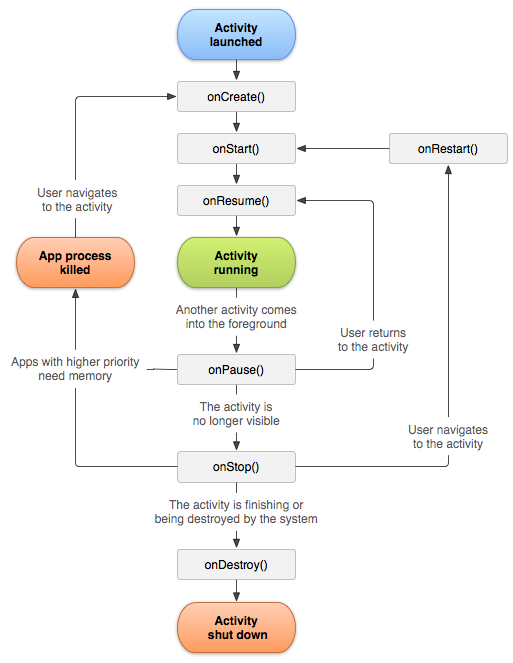
这张图列出了Activity生命周期最主要的一些方法,启动后依次执行:
onCreate --> onStart --> onResume --> onPause --> onStop --> onDestroy
相信很多人也都已经知道以上方法与执行顺序,但是Activity还有其他方法,如onContentChanged, onPostCreate, onPostResume, onConfigurationChanged, onSaveInstanceState, onRestoreInstanceState,没有什么比自己做个Demo亲自试验研究下更有说服力了,下面我做了一个Demo来彻底研究下这些生命周期的方法,建议大家也亲自试验下:
{% highlight ruby %} public class DemoActivity extends Activity {
static final String TAG = DemoActivity.class.getSimpleName();

@Override
public void onCreate(Bundle savedInstanceState) {
    super.onCreate(savedInstanceState);
    Log.d(TAG, "onCreate");
    setContentView(R.layout.activity_demo);
}

@Override
public void onContentChanged() {
    super.onContentChanged();
    Log.d(TAG, "onContentChanged");
}

public void onStart() {
    super.onStart();
    Log.d(TAG, "onStart");
}

public void onRestart() {
    super.onRestart();
    Log.d(TAG, "onRestart");
}

public void onPostCreate(Bundle savedInstanceState) {
    super.onPostCreate(savedInstanceState);
    Log.d(TAG, "onPostCreate");
}

@Override
public void onResume() {
    super.onResume();
    Log.d(TAG, "onResume");
}

public void onPostResume() {
    super.onPostResume();
    Log.d(TAG, "onPostResume");
}

public void onPause() {
    super.onPause();
    Log.d(TAG, "onPause");
}

public void onStop() {
    super.onStop();
    Log.d(TAG, "onStop");
}

public void onDestroy() {
    super.onDestroy();
    Log.d(TAG, "onDestroy");
}

public void onConfigurationChanged(Configuration newConfig) {
    super.onConfigurationChanged(newConfig);
    Log.d(TAG, "onConfigurationChanged");
}

public void onSaveInstanceState(Bundle outState) {
    super.onSaveInstanceState(outState);
    Log.d(TAG, "onSaveInstanceState");
}

public void onRestoreInstanceState(Bundle outState) {
    super.onRestoreInstanceState(outState);
    Log.d(TAG, "onRestoreInstanceState");
}
} {% endhighlight %}
程序启动运行并结束上述生命周期的方法执行顺序是这样的:
onCreate --> onContentChanged --> onStart --> onPostCreate --> onResume --> onPostResume --> onPause --> onStop --> onDestroy
onContentChanged
onContentChanged()是Activity中的一个回调方法 当Activity的布局改动时,即setContentView()或者addContentView()方法执行完毕时就会调用该方法, 例如,Activity中各种View的findViewById()方法都可以放到该方法中。
onPostCreate、onPostResume
onPostCreate方法是指onCreate方法彻底执行完毕的回调,onPostResume类似,这两个方法官方说法是一般不会重写,现在知道的做法也就只有在使用ActionBarDrawerToggle的使用在onPostCreate需要在屏幕旋转时候等同步下状态,Google官方提供的一些实例就是如下做法:
{% highlight ruby %} @Override protected void onPostCreate(Bundle savedInstanceState) { super.onPostCreate(savedInstanceState);
// Sync the toggle state after onRestoreInstanceState has occurred.
mDrawerToggle.syncState();
} {% endhighlight %}
onPause、 onStop
这里顺便再提一下onPause、 onStop的区别, onPause是在整个窗口被半遮盖或者半透明的时候会执行,而onStop则是在整个窗口被完全遮盖才会触发, 触发onStop的方法之前必定会触发onPause方法。
onCreate、 onStart
onCreate方法会在第一次创建的时候执行,紧接着便会执行onStart方法,之后页面被完全遮挡会执行onStop方法,再返回的时候一般便会执行onRestart --> onStart方法, 但是如果如果这时候App内存不够需要更多的内存的时候,App便会杀死该进程,结束掉该Activity,所以这时候再返回的时候便会重新执行onCreate --> onStart --> onResume方法。
onSaveInstanceState、 onRestoreInstanceState
这是一个比较深入的话题,后面博文会单独来讲。